
App Store Spotlight on Home Contents
April 11th, 2025
 Tagged: Aso Services, App Ranking, App Metadata, Aso Strategy, App Store Spotlight
By David Bell
CEO at Gummicube, Inc.
When it comes to building visibility and driving downloads in the App Store, even the most functionally sound apps can benefit from a strategic app store optimization (ASO) makeover. With over 1.8 million apps currently available on the App Store, discoverability is no longer a passive benefit — it’s a competitive necessity. If your app doesn’t surface in relevant search results or convert page views into downloads, it won’t survive in today’s mobile-first ecosystem.
In this spotlight, we’re reviewing Home Contents, a home inventory app designed to help users catalog and value their belongings. We'll explore where it's succeeding, where it can improve, and what actionable ASO tips can help boost its presence. We’ll also compare it to a top competitor in the same space to underscore what best-in-class optimization looks like. Along the way, we’ll dive into why testing your app’s visual and written assets is no longer optional — and how even subtle changes can have a significant impact on performance.
Whether you’re a developer looking to boost installs, a marketer seeking conversion wins, or simply trying to better understand App Store dynamics, this breakdown offers a comprehensive view of how to elevate your app listing — using Home Contents as a case study.
APP TITLE ANALYSIS OF HOME CONTENTS
The app's current title, Home Contents, offers basic clarity on its function. Users can reasonably assume that the app helps with storing or tracking information about household items. However, this name only uses 13 of the 30 characters allowed by the App Store.
From an ASO perspective, this is a missed opportunity. The title is one of the most heavily weighted areas for keyword indexing. By expanding the title, the app can significantly increase its visibility in search results.
Improve App Title:
- Home Contents: Quickly Catalog
- Home Contents: Track & Catalog
Both of these options hit the 30-character limit, improve keyword relevance, and more clearly articulate the app’s function to potential users. Including verbs like "Track" and "Catalog" enhances keyword coverage and encourages conversions.
APP SUBTITLE OPTIMIZATION FOR BETTER KEYWORD REACH
The current subtitle, House inventory & valuation, utilizes 27 out of the 30 characters available. It efficiently communicates two primary use cases of the app: listing items and assessing their worth.
This subtitle is informative and keyword-rich. It reinforces the app’s main utility, which is helpful for both ranking in relevant searches and improving user comprehension.
Why it works:
- Addresses user intent clearly
- Includes high-value keywords like "inventory" and "valuation"
- Quickly conveys the app’s core function
While the subtitle performs well, it would still benefit from mobile app A/B testing alternative phrasings to ensure maximum performance:
Improve App Subtitle
- Home Inventory & Tracker App
- Catalog & Value Home Items
- Track Items for Insurance
These alternatives bring in keywords that may resonate more with search trends and expand the reach of the listing.
APP SCREENSHOT BREAKDOWN: WHAT HOME CONTENTS IS MISSING VISUALLY
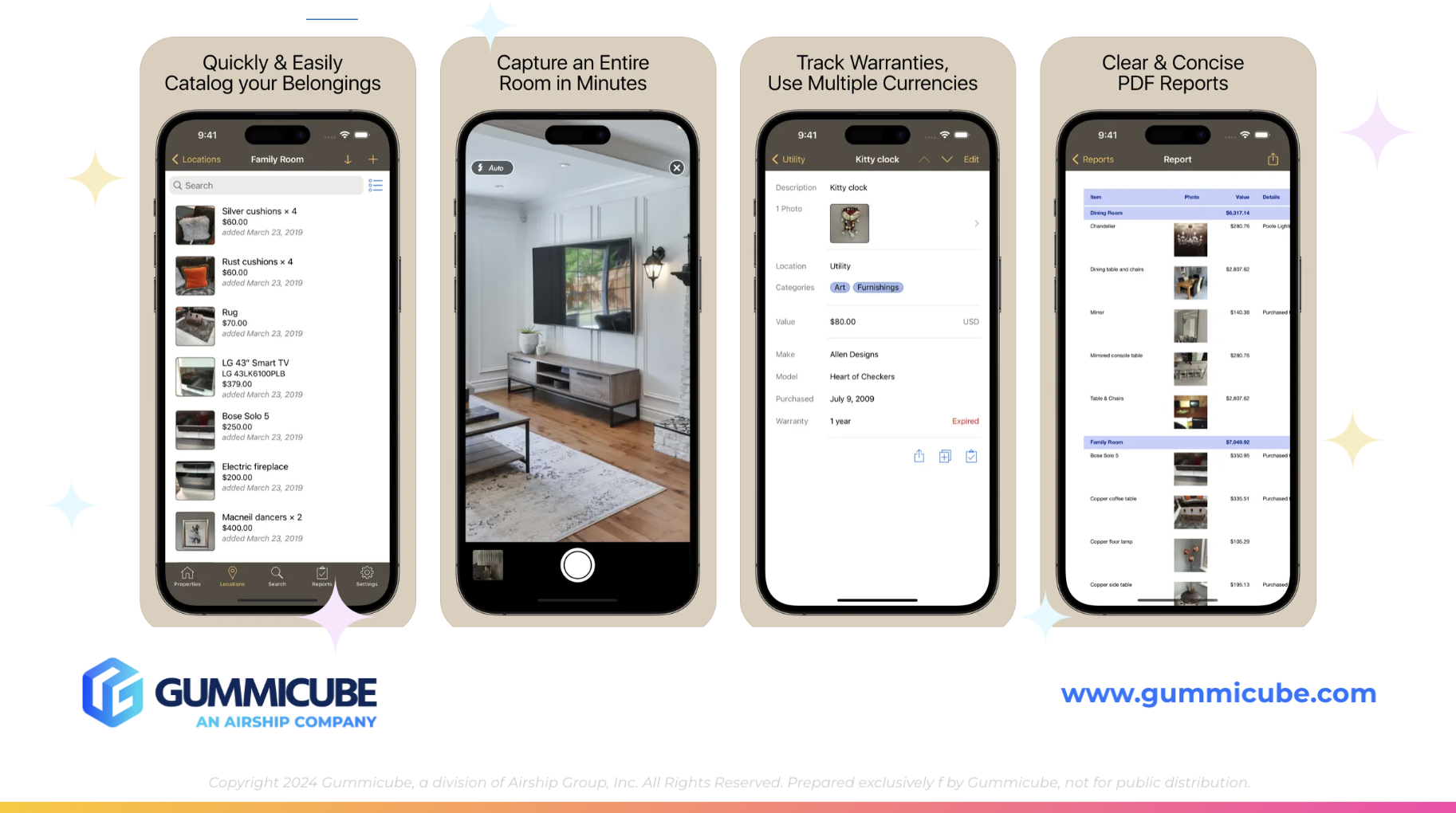
Creative assets are critical to converting impressions into installs. Currently, Home Contents is only utilizing 5 of the 10 allowed screenshots. That’s 50% of the available space left unused, which limits the potential reach of the app listing.
Opportunities for improvement:
- Text Placement and Size: The current text is small, thin, and crowded at the top, making it difficult to read. Enlarging and bolding the text would significantly enhance clarity and impact.
- Layout and Pacing: Each screenshot attempts to communicate too much at once. Breaking up the information across additional screenshots can make the message easier to digest.
- Mockup Design: The plain iPhone mockups don’t capture attention. A more engaging approach could involve zoom-ins on app features, adding subtle visual flourishes, or even creating multi-frame mockups that stretch across two images.
By updating their screenshots, the app can:
- Increase engagement with users scanning the page quickly
- Showcase the app’s top features more dynamically
- Create a visual narrative that reinforces app utility and ease of use
A/B testing different layouts, captions, and designs can provide valuable insights into which creative directions perform best with potential users.
APP STORE VIDEO POTENTIAL: WHY HOME CONTENTS NEEDS AN APP PREVIEW
Home Contents currently lacks an App Preview video. This is a major opportunity to improve conversion rates. A brief 15–30 second video highlighting how users can quickly catalog their belongings, generate valuations, or export reports could make a strong first impression.
Videos are especially powerful given modern browsing habits — users often prefer short-form video content to scrolling through text or images. A clean, informative preview of the app’s UI and functionality would immediately set Home Contents apart.
APP KEYWORD OPTIMIZATION WITH ASO TOOLS
Title and subtitle fields aren’t the only metadata worth optimizing. With ASO tools like DATACUBE, developers can:
- Identify relevant, high-volume keywords
- Analyze competitor rankings in similar categories
- Fill keyword gaps to expand organic search presence
For Home Contents, potential keywords to include in their screenshots might include:
- "home inventory app"
- "insurance catalog"
- "household item tracker"
- "Organize before you move"
Developers should also be mindful of keyword trends over time. Consumer interest can shift seasonally (for example more downloads during moving season or spring cleaning), and your keyword strategy should reflect that flexibility.
THE POWER OF MOBILE APP A/B TESTING
A/B testing — also known as split testing — is the process of comparing two or more variations of your app listing to determine which version performs better. Apple’s native product page optimization tools, along with third-party solutions like SplitCube, allow developers to test icons, screenshots, videos, and even metadata in real-time with live traffic.
Why it matters:
- Data-driven decisions: Rather than guessing which design works best, A/B testing your app listing reveals what users actually prefer.
- Improved conversion: Testing can uncover subtle changes — like color contrast, button placement, or word choice — that yield major improvements in download rates.
- Reduced risk: By testing changes with a subset of users, you avoid rolling out a full redesign without validation.
For Home Contents, testing new screenshot sets or alternate subtitle versions could yield clear insights into user behavior — ultimately helping refine the listing for higher conversions.
APP COMPETITOR ANALYSIS: WHAT UNDER MY ROOF DOES WELL IN THEIR ASO
Let’s take a look at a top competitor that showcases a polished and fully optimized app store presence: Under My Roof Home Inventory +.
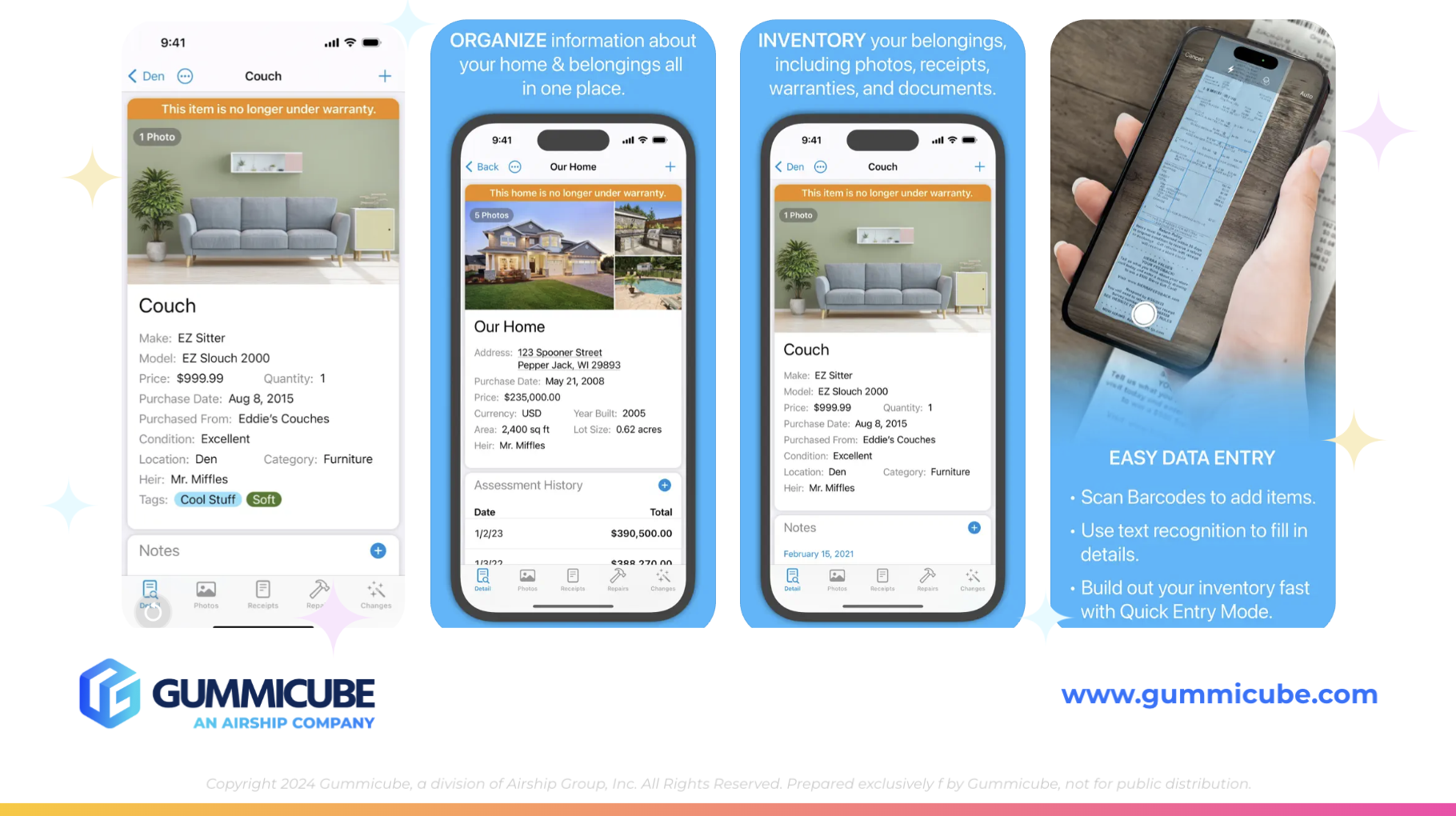
Title: Utilizes the full 30-character limit. The title combines brand identity with functional clarity by using terms like "Home Inventory" and adding a stylistic "plus" symbol that contributes to its modern look.
Subtitle: Organize & Manage your House. This subtitle uses 28 of the 30 characters and communicates a clear benefit. It’s broad enough to cover multiple use cases but specific enough to connect quickly with user needs.
App Screenshot Strategy:
- Full use of all 10 available screenshots
- Design variations keep visual interest high
- Bold white text on sky-blue backgrounds improves readability
- Creative use of multi-screen mockups helps guide the eye across features
App Store Video Integration:
- Features an App Preview video that clearly demonstrates the app experience
- Helps users understand the flow and ease of use before downloading
- Capitalizes on short attention spans with succinct storytelling
While Under My Roof’s screenshots are slightly more crowded with text, their dynamic layouts and the presence of an app store video more than compensate. The result is a listing that looks complete, professional, and highly engaging.
CONCLUSION: ASO ISN’T OPTIONAL — IT’S SURVIVAL
In today’s competitive App Store environment, even the most practical and well-built apps need more than functionality to succeed. Without a clear and compelling ASO strategy, apps risk being overlooked, no matter how valuable they are.
Home Contents shows strong potential but currently underutilizes several critical areas of its listing. The title doesn’t fully capitalize on keyword reach, the screenshots leave storytelling opportunities on the table, and the lack of an App Preview video limits engagement. These aren’t just design gaps — they’re missed chances to drive visibility, build trust, and increase installs.
Meanwhile, leading competitors are taking full advantage of every available surface to attract users and convert at a higher rate. To remain competitive, Home Contents will need to strengthen its App Store Optimization strategy — from creative assets to metadata — to meet the expectations of today’s mobile audience.
ASO isn’t an afterthought. It’s the foundation of discoverability and a key driver of user growth.
LET’S CHAT!
If you're ready to elevate your app store presence, Gummicube is here to help. As the leaders in App Store Optimization, we specialize in boosting app visibility, improving conversion rates, and driving sustained user growth through data-backed strategies.
With proven expertise across all major app categories, our app store optimization services are built to help your app outperform the competition and climb the ranks.
More blog-posts like this:
Key ASO Takeaways from Poshmark’s App Listing
Poshmark is a well-established marketplace for buying and selling fashion, yet its App Store listing still has opportunities to improve app keyword visibility and more effectively communicate its value proposition.

The MapQuest App Store Comeback
After once being one of the most recognizable names in navigation, MapQuest has made a notable return to the Apple App Store.

Leveling Up DAZN’s ASO Game Plan
For an app like DAZN, visibility and conversion need to work together. Read more!